Your whole business,
in a single tab.
Quotes, invoices, clients, appointments, time off, documents. Everything is already here, and it all talks to the rest: the client you just created is the one on the invoice you send a minute later.
No credit card · Ready in two minutes · Your data stays yours
What slows you down today
Three re-entries, and half a day gone
The work itself isn't what costs you. It's the redo, because the information lived somewhere else.
The same client entered three times
Once in the CRM, once for the invoice, once in the tracker. When the address changes, it changes in one place out of three — and the copy that didn't move is the one that ends up on the document.
The invoice that falls behind
An accepted quote forgotten, a reminder never sent, a payment recorded nowhere. The revenue exists, but you have to rebuild it to know where it stands.
Eight tools, eight invoices
Billing, CRM, support, calendar, HR, documents, office suite, PDF editing. Eight tools that don't talk to each other, eight renewals to watch, and nobody to answer when one of them goes down.
Tools
Eight tools, one database
Every tool is complete. What sets them apart from a classic suite is that they share the same data: creating a client in the CRM makes it available for the invoice, the support desk, and the portal.
Billing
Quotes, invoices, reminders, and payments, without a spreadsheet.
- Quote to invoice in one click
- Automatic reminders
- Credit notes and deposits
CRM
Contacts, companies, and deals, in the same place as your invoices.
- Stage-by-stage pipeline
- History of every exchange
- No double entry
Support
A public desk where your clients write, and your answers in the same place.
- Public desk
- Tracked tickets
- Knowledge base
Calendar
Your appointments, your availability, and your booking links.
- Appointment types
- Each guest's time zone
- Automatic reminders
Documents
Your documents in one place, with the office editors built in.
- Docs, Sheets, and Slides
- Whole folders
- Unrestricted downloads
HR
Time off, expenses, and employee files, with no manual follow-up.
- Requests and approvals
- Expenses
- Balances always current
Client portal
Your clients check quotes and invoices without calling you.
- Quotes and invoices online
- Payment from the portal
- Messaging
PDF editing
Open, annotate, and sign a PDF without leaving the browser.
- Annotations
- Form filling
- Electronic signature
One account covers all eight tools. Free during the beta — no tiers, no add-ons.
Take a look
Two tools, up close
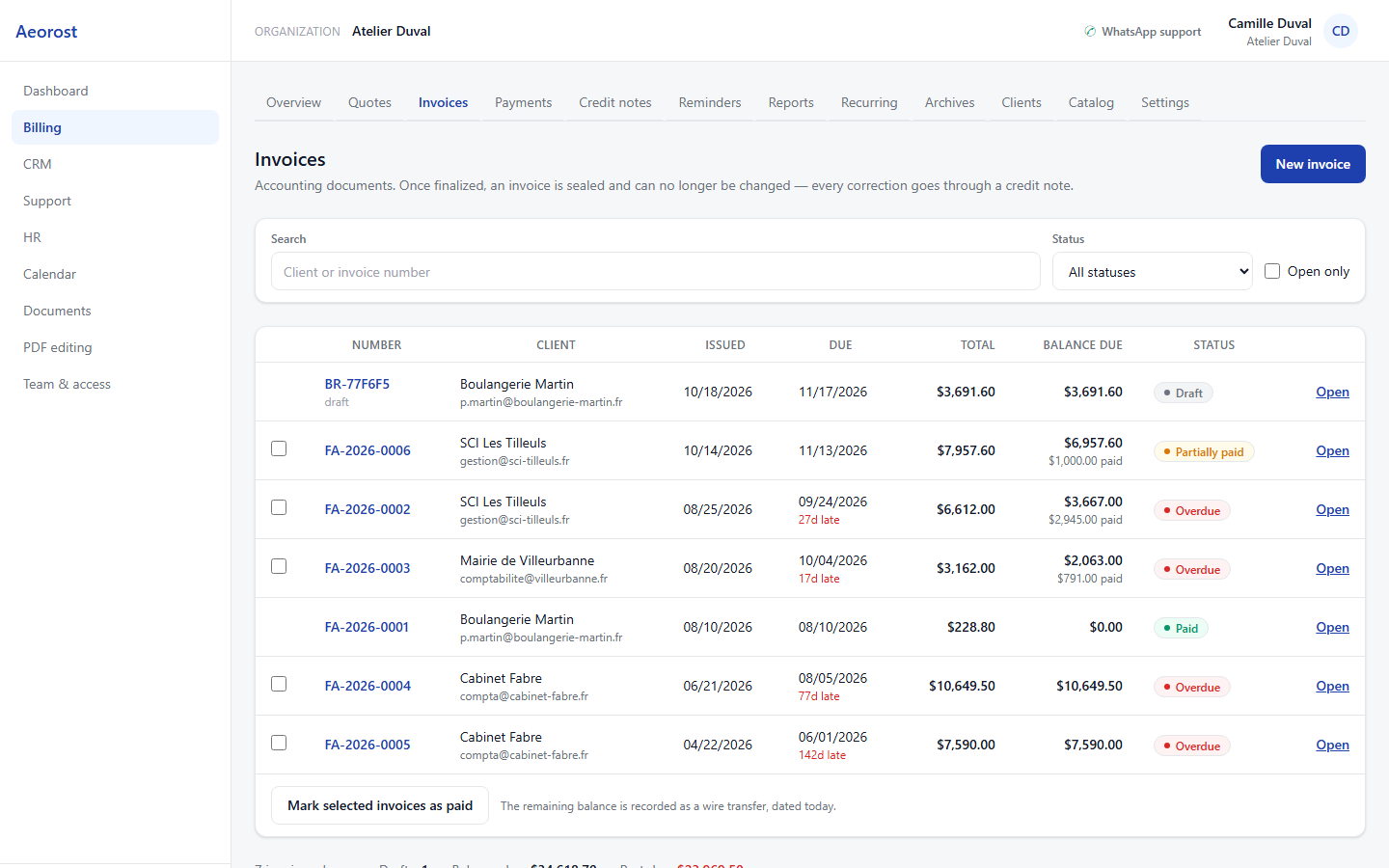
An accepted quote becomes an invoice, with no retyping
The quote, the invoice, and the credit note share the same case number. A line corrected in the quote corrects the invoice; a partial payment shows up immediately in the amount still due.
- Continuous numbering, documents sealed once finalized
- Automatic reminders based on the due date
- Credit notes and deposits without leaving the case
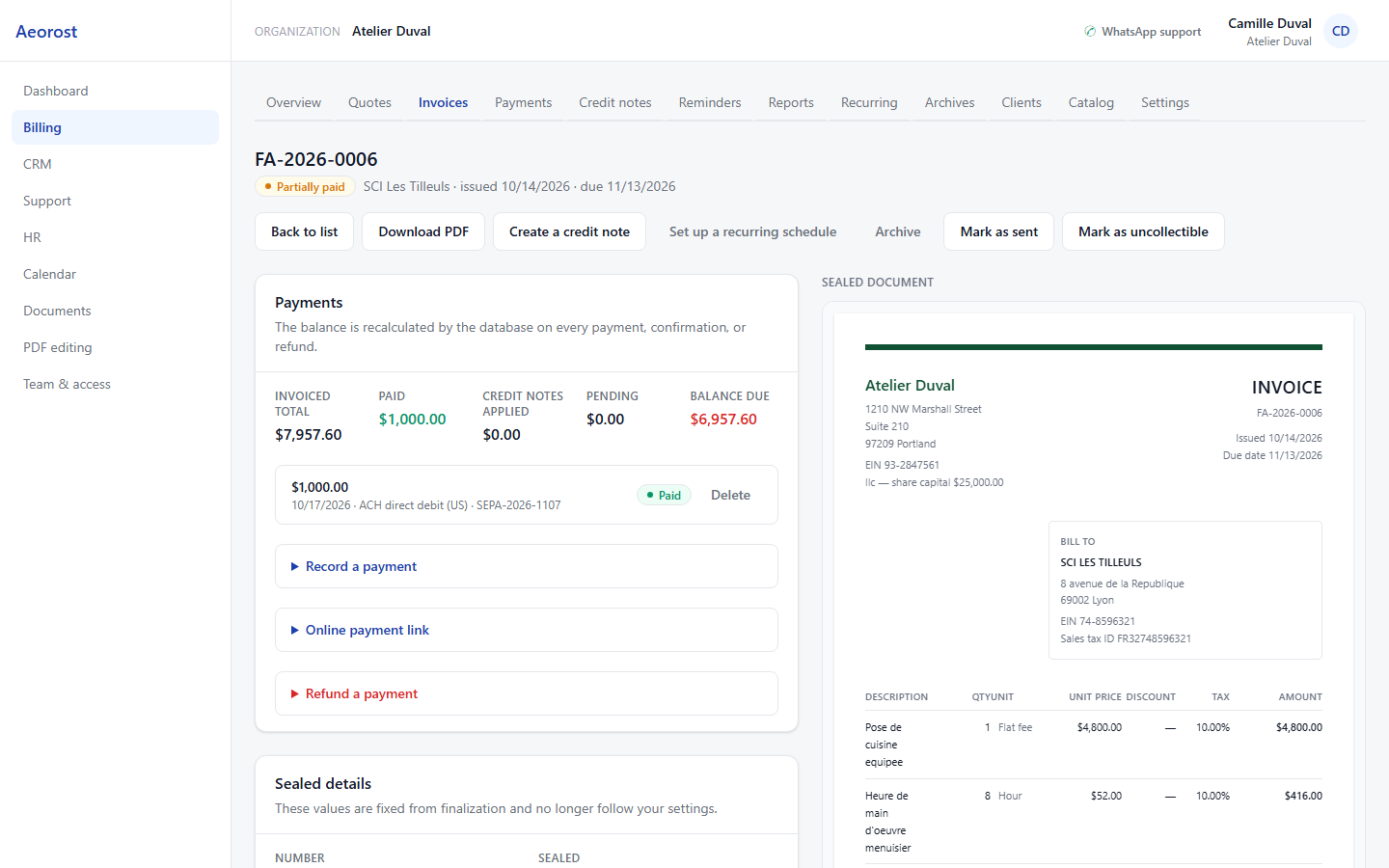
Docs, Sheets, and Slides, in the browser
No need for a separate office suite: the editors are included, and they read .docx, .xlsx, and .pptx files. Drop a whole folder, find every file by its path, and download what you want, when you want.
- Docs, Sheets, and Slides editors included
- Full folder uploads, subfolders included
- No file size cap
Getting started
Two minutes, and you're invoicing
- 1
Create your workspace
A name, an email address. No credit card, no install: everything runs in the browser.
- 2
Import your clients
Your existing file is enough. Duplicates are caught before the import, not after.
- 3
Get to work
A quote goes out, an invoice follows, a client pays. All eight tools share the same data: nothing to re-enter.
Why us
Four reasons to stay
Four points, and none of them is about features. These are the reasons people stay, not the reasons they sign up.
One login
Not a suite made of six acquired products stitched together: one piece of software, one database, one sign-in screen.
Your data stays isolated
Each organization sees only its own rows, at the database level. It isn't the interface hiding things: it's PostgreSQL refusing.
Ready for the United States
Dollars, EIN, and state tax, US time zones by default. Nothing to adapt the day you cross the Atlantic.
No commitment
You stop whenever you want, and you take your data with you. Nothing is locked behind a subscription you forgot to cancel.
Storage
100 GB for every person
Documents, contracts, invoices, and scans live in the same workspace as the rest. No extra cost, and nothing to configure.
100GB
per user, included
Per person, not per account
Each person on your team gets their own space. Someone who joins does not eat into yours, and someone who leaves frees it.
All file types
PDF, Office files, images, archives. Subfolders keep their structure, and nothing is compressed on the way in.
No per-file cap
A large scan or a video goes through like the rest. The limit is the space you have, not the size of one file.
Pricing
One price, everything included
No extra charge per tool, no tiers to compare. One account, all of them, and storage for every person on your team.
Aeorost Suite
$63.17/ user / month
Free during beta
Every tool, every user — no card, nothing to cancel.
Everything included
- All 8 tools, no tiers
- Docs, Sheets, and Slides editors
- 100 GB of storage per user
- Client portal
- Unlimited users
- Direct WhatsApp support
8 tools, free for the whole beta, no credit card.
Questions
What we get asked
Where is my data, and who can see it?
It lives in a PostgreSQL database partitioned by organization: every query filters at the database level, not in the interface. Nobody at Aeorost looks at your records without your explicit consent.
Do I have to start from scratch?
No. Clients, items, and balances import from a file. You keep invoicing from day one, and the history fills in as you go.
What if I have a problem?
You message us on WhatsApp, at the top of the app, and you talk to someone who builds the product. No call center, no ticket gathering dust.
Does it work in dollars?
Yes, and that's the default. Currency, state taxes, date formats, time zones: everything is set up for US use.
Can I stop whenever I want?
Yes. There is nothing to cancel during the beta, and no fixed term afterwards. You export your clients, your invoices, and your documents, and you leave with them.
Is it finished, or still a work in progress?
All eight tools work today. The product is in beta: it changes every week, and what you report goes straight onto the roadmap.
A question, or ready to try?
Access is free for the whole beta, and asks for no card. If you'd rather talk first, write to us: the same person answers.